My Lightning Tracker Pro
- 4.7
- Rating
- 100.00K
- Installs
- $4.99
- Price

 Analysis by App-foxy
My first impression of My Lightning Tracker Pro was that it is much more focused than a normal weather app. Instead of trying to be an all-purpose forecast dashboard, it puts thunderstorms and lightning activity at the centre of the experience. That narrow purpose is also its main reason to exist: when a storm is approaching, I can look at a map built around strikes, radar movement and alerts rather than hunting through several forecast screens.
Developed by JRustonApps B.V., this is a paid weather app for Android users who want more awareness of electrical storms. It costs $4.99, carries an Everyone age rating, and has reached over 100 thousand installs. The current version is 26.3.1, and it runs on Android 8.0 or later. Those details make it fairly accessible, although the price means I would not recommend buying it simply out of curiosity.
After using it, my honest view is that its value depends on how often lightning matters in your life. If you spend time outdoors, travel through storm-prone areas, work around changing weather, or simply want a more direct warning than a general forecast provides, it can become a useful part of a routine. If you only check the weather to decide whether to carry an umbrella, a standard free weather app will probably be enough.
You May Also Like

 Blood Strike: 2.5 Anniversary
Blood Strike’s Loadouts Turn Every Drop Into a Tactical Gamble
A close look at Blood Strike’s custom loadouts: how fast access to signature weapons reshapes its battle royale rhythm, rewards preparation, and narrows the gap between fights.

 Pandora - Music & Podcasts
Pandora’s Music Is Easy to Start, but Harder to Recover
Pandora’s strength is its low-effort path from a seed to a station. Its weak spot is how much confidence it asks you to place in connection, setup, and quiet recovery.

 8 Ball Pool
 Is Built on Rivalries, Rematches, and Routine
A close look at the rivalries, rematches, shared routines, and unanswered safety questions that turn a quick pool match into a persistent mobile community.

 Samsung Music
’s Quiet Strength Is Playing What You Already Own
Its reach comes less from spectacle than from dependable access to a personal library. That simplicity is both the app’s strongest retention engine and its ceiling.

 AccuWeather: Weather Radar
AccuWeather Review: A Quick, Clear Forecast for Everyday Decisions
For everyday plans, the best forecast is the one you can understand quickly. AccuWeather makes rain timing, radar, and local conditions easy to act on, with a few trade-offs.

 Hill Climb Racing
Why Hill Climb Racing Still Turns Crashes Into One More Run
A tiny car, a bumpy hill and one more upgrade: Hill Climb Racing keeps resurfacing because its simple chaos makes every near-miss feel personal.
More From Our News Desk



What keeps it useful after the first week
I judge an app’s staying power by whether it helps me make a better decision, not by how often I open it. In this section, I look at the small routines that keep lightning information relevant without turning every change in the sky into a distraction. I’ll also consider how those habits shape the app’s value over time.
The immediate appeal is clear and practical
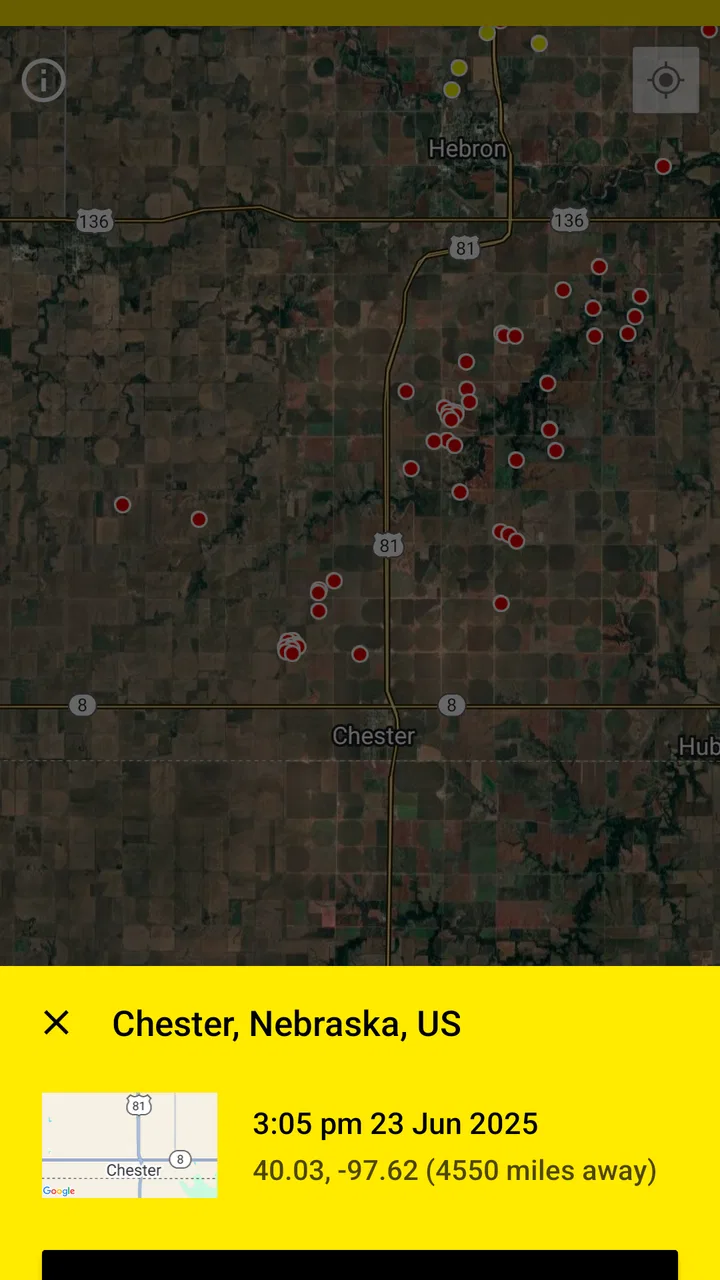
The first week is when this app makes the strongest impression. The lightning map gives me a visual answer to a question that ordinary forecasts often handle vaguely: is storm activity actually nearby, and is it moving toward the area I care about? Radar adds context, because a strike on its own does not explain the full shape or direction of a weather system.
I found the map most useful when I stopped treating it like a general forecast and used it for short decisions. Before taking a bicycle ride, planning a walk, or leaving an outdoor event, I could check the current storm picture instead of relying only on a morning forecast. That does not remove uncertainty, but it makes the decision more informed.
The lightning alarm is the feature that gives the app a recurring role rather than making it just an interesting map. An alert can matter when I am not actively looking at the screen, especially during a busy day when weather changes in the background. The important distinction is that an alarm is most helpful as a prompt to reassess conditions, not as permission to continue an outdoor plan until the last possible moment.
During the first few days, I also paid attention to how the map and radar complement one another. The lightning layer answers where electrical activity is being detected, while radar helps me understand whether the wider rain area is expanding, passing by, or approaching. Looking at only one layer can lead to a narrow reading of the situation. Using both gives a better practical picture.
A realistic everyday routine
Imagine a weekday when I plan to walk home after work. The sky looks unsettled, but there is no rain yet. I can open the app, check whether strikes are clustered near my route, and compare that with the radar view. If the activity is moving closer, I might delay the walk or choose public transport. If the storm is clearly moving away, I may still go, while remaining alert to changing conditions.
That workflow is more useful than repeatedly refreshing a generic hourly forecast because it connects the information to a specific decision. The app is not trying to tell me everything about the day. It helps me answer whether lightning activity deserves immediate attention.
For outdoor workers, runners, campers and people responsible for children at sports activities, that focused view can save time. It is also useful for anyone who wants a quick visual check without reading a long forecast. The best results come from checking before an activity and again when the sky or local conditions change.
Why the paid model changes the decision
Because this is a $4.99 app rather than a completely free download, I judge it by whether I will return to it. The purchase feels easier to justify for someone who regularly needs lightning information than for a casual weather watcher. There are also in-app purchases priced at $0.99 per item, so I would review the available options carefully before assuming the initial cost covers every possible extra.
The app has an average rating of 4.7 from around 9.7 thousand ratings, with 543 written reviews. That suggests a generally positive reception, but ratings alone cannot decide whether it suits my habits. A highly rated specialist tool can still be unnecessary if I rarely encounter thunderstorms or already have a weather service that covers my needs well.
My advice is simple: buy it for a repeated use case, not for the novelty of watching dots appear on a map. The novelty fades quickly. The question is whether lightning awareness is something you genuinely need often enough to build into your routine.
Month-to-month value, upkeep and fatigue
Long-term value depends on whether the app keeps earning attention without making storm checks feel like a chore. Here, I consider the balance between its focused alerts and the repetition that can come with frequent storms, then turn to practical ways to keep the tool useful rather than letting it fade into background noise. Selective checking is the key trade-off I’ll explore.
The monthly habit is light, but it must be intentional
My preferred long-term habit is not to leave the app open constantly. I use it before outdoor plans, when a storm is forecast, and whenever local conditions seem to be changing faster than expected. That keeps the app from becoming background noise while preserving its strongest function.
This is one of its less obvious advantages: it works better as a decision tool than as a screen to stare at all day. A quick check before leaving home, followed by another look if the weather shifts, is more sensible than repeatedly watching the map without a clear purpose.
For people who live in areas with frequent storms, the lightning alarm can make the app part of a monthly safety routine. I would still combine it with common sense and local guidance. No map or alert should be treated as a complete substitute for observing the sky, following official warnings, or moving indoors when thunderstorm conditions become dangerous.
Maintenance is mostly about keeping the habit useful
The maintenance burden is not the same as maintaining a large productivity app or a social network. There is no content library for me to organise and no complicated personal database to keep tidy. The real maintenance is behavioural: I need to decide when alerts are useful and when they would only interrupt my day.
If I enable every possible notification without thinking about my schedule, the app can become tiring. A specialist warning tool has value because it draws attention at the right time; too many unnecessary interruptions weaken that value. I would start with the alert setup that matches my normal area and activities, then adjust it after seeing how often the warnings are relevant.
It is also worth checking the app after installing or updating it to make sure the map, radar and alarm behave as expected on the phone. The current release is 26.3.1, and the minimum requirement of Android 8.0 means it can serve older compatible devices, but performance and background behaviour can still vary between phones. I would not assume that every handset handles alerts identically without testing them.
Three practical lessons I would use
Use radar to add movement and shape to the lightning view. A single strike marker is easy to overinterpret. Comparing it with radar helps me distinguish an isolated-looking signal from a broader storm system that deserves more caution.
Test the alarm before relying on it for an important outdoor plan. I would rather learn how the notification behaves during an ordinary storm than discover a problem when I am already away from home. The alarm should support a plan, not be the only part of one.
Check the app at decision points instead of continuously. Before departure, during a noticeable weather change, and before returning outdoors are more meaningful moments than constant refreshing. This reduces notification fatigue and keeps the information connected to action.
These habits also reveal the app’s trade-off. It can make storm monitoring more focused, but it cannot make the weather predictable. Lightning activity can change quickly, and a map is still a representation of conditions rather than a guarantee about what will happen at my exact location.
Where fatigue can set in
The main source of fatigue is repetition. If I live somewhere with frequent storms, repeated alerts may start to feel routine, particularly when I am indoors and the warning does not require any action. That does not make the feature useless, but it means I need to be selective about how I use it.
Another possible frustration is that a specialist app can feel excessive on calm days. Unlike a broad weather app that I might open for temperature, wind or a weekly forecast, this one has a narrower reason to be opened. Its recurring value is therefore uneven: high during stormy periods, modest during quiet ones.
The paid entry point can create a different kind of fatigue. If I buy it and then discover that thunderstorms rarely affect my plans, the app may sit unused even though it works well. The purchase is easier to defend for a family, outdoor enthusiast or worker who repeatedly needs this information than for someone who only wants a more interesting weather screen.
How it compares with usual weather alternatives
A conventional weather app is usually better for broad daily planning. It may be the more convenient choice when I need temperature, precipitation, wind and a longer forecast in one place. For those tasks, a dedicated lightning tool can feel too specialised.
My Lightning Tracker Pro is stronger when the specific question is about electrical storm activity. Its map, radar and lightning alarm put that concern ahead of unrelated forecast details. I would use a general weather app for deciding what to wear and this app for deciding whether an outdoor activity should be delayed because of storm development.
It also differs from simply checking a website or a free forecast service. The value here is the focused workflow: open the app, inspect the lightning picture, compare the radar, and respond to an alert. Whether that convenience is worth paying for depends on how often I need it. Someone who already has reliable lightning notifications elsewhere may gain little by adding another tool.
Who should use it, and who should skip it
I would recommend it to people who spend meaningful time outdoors, live in regions where thunderstorms regularly affect plans, or want a dedicated way to monitor lightning rather than relying on general weather language. Parents organising outdoor activities and people whose work depends on changing conditions may also appreciate the focused alerts.
I would skip it if I only need a normal forecast, rarely encounter storms, or dislike managing notifications. I would also hesitate if I already use another service that provides dependable lightning maps and alarms in a workflow I understand. Adding a second specialist app can create confusion instead of clarity.
The Everyone rating makes it broadly suitable from an age-classification perspective, but that should not be confused with making the weather risk-free. Younger users should still have an adult decide what action to take when storms are nearby. The app can provide information; it cannot replace judgement.
My long-term verdict
After the first-week novelty fades, this app earns space only when lightning awareness solves a recurring problem. For me, its lasting strength is the combination of a dedicated strike map, radar context and an alarm that can bring attention to changing storm conditions. Those pieces form a coherent tool rather than a collection of decorative weather layers.
Its weakness is equally clear: the subject is narrow, and the usefulness rises and falls with the weather and with my lifestyle. I would not keep opening it every day just because it is installed. I would keep it available because certain days make a focused lightning view more valuable than a general forecast.
At $4.99, I see it as a practical specialist purchase rather than an essential app for everyone. The additional $0.99 in-app items make it sensible to understand what is included before spending more. The strong 4.7 average and more than 100 thousand installs show that it has found an audience, but my recommendation remains conditional: buy it if you can name the situations in which you will use the map or alarm.
My final judgement is positive, with that important qualification. This is worth keeping when it supports a real storm-monitoring habit, not when it is merely another weather app on the phone. If outdoor safety, travel planning or frequent thunderstorms make lightning information part of your month, it can remain useful long after the initial curiosity disappears. If not, a regular weather app will likely give you more everyday value with less specialised focus.
FAQs for My Lightning Tracker Pro
01What is My Lightning Tracker Pro and what does it do?
My Lightning Tracker Pro is a weather utility designed to monitor lightning activity in real time. It can show nearby strikes on a map, provide alerts when lightning is detected in your area, and help you follow storm movement. During testing, the app felt most useful for outdoor planning, travel, sports, and anyone who wants an additional warning when thunderstorms are approaching.
02How accurate are the lightning locations and alerts?
The app relies on lightning-detection data and location services to estimate where strikes occur and how close storms are to you. Accuracy can vary depending on regional coverage, network conditions, GPS precision, and the delay between detection and notification. It should be treated as an informative monitoring tool rather than an official emergency-warning system, so users should also check local weather authorities.
03Does My Lightning Tracker Pro require location access and an internet connection?
Yes, location permission is important if you want alerts and map information tailored to your current position. The application also needs an internet or mobile-data connection to receive updated lightning reports and display current activity. If location access is disabled, some features may still work manually, but nearby notifications and location-based monitoring can be limited or unavailable.
04What advantages does the Pro version offer compared with a basic lightning tracker?
The Pro edition is intended for users who want a more complete experience, commonly including fewer or no advertisements, enhanced notifications, and access to additional monitoring or customization options depending on the current release. Before downloading, review the store listing carefully because features and subscription or one-time purchase terms can change between versions, regions, and operating systems.
05Can My Lightning Tracker Pro be used as a safety tool during storms?
It can be useful for increasing awareness of nearby lightning, but it should not replace official warnings, weather radios, emergency notifications, or common-sense storm safety. Lightning can strike outside the most visibly active part of a storm, and alerts may be delayed or affected by connectivity. If thunder is audible, move indoors or into a hard-topped vehicle and follow local safety guidance.
Pros
- Accurate lightning alerts with customizable distance and notification settings.
- Interactive maps make it easy to monitor storms in nearby and distant areas.
- Useful statistics show lightning activity and storm history over time.
- Ad-free experience provides cleaner navigation and fewer distractions.
- Works well for outdoor planning
- travel
- and storm-spotting enthusiasts.
Cons
- Some advanced features may require an active internet connection.
- Alerts can arrive late when storms move quickly or coverage is limited.
- Battery use may increase if location tracking and frequent alerts are enabled.
- The interface may feel overly detailed for users wanting simple weather updates.
- Lightning data accuracy depends on regional detection coverage and network quality.

My Lightning Tracker Pro
Gallery